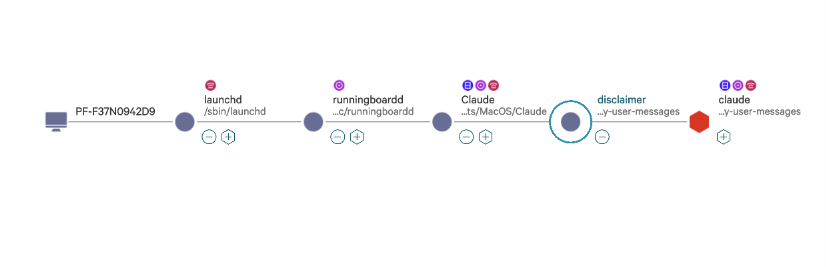
Most users never see the command line Claude Desktop runs under the hood. It’s not hidden; it’s just buried in a process list. But if you look, you’ll find something alarming:
/path/to/claude --output-format stream-json --verbose --input-format stream-json --max-thinking-tokens 31999 --effort high --model claude-opus-4-7[1m] --debug-file /path/to/debug.log --permission-prompt-tool stdio --resume <session-id> --allowedTools Task,TaskCreate,TaskUpdate,TaskGet,TaskList,TaskStop,WebSearch,Skill,ToolSearch,Read,Edit,Write,Glob,Grep,AskUserQuestion --disallowedTools Bash,NotebookEdit,REPL,JavaScript,WebFetch --tools Task,Glob,Grep,Read,Edit,Write,TaskCreate,TaskUpdate,TaskGet,TaskList,TaskStop,WebSearch,Skill,AskUserQuestion,ToolSearch --permission-mode default --allow-dangerously-skip-permissions
--allow-dangerously-skip-permissions: the flag that triggered our rule
That last flag is what triggered our EDR rule. We’ve written about what happens when this trust model breaks in practice (real incidents, real damage) in From Friend to Foe: AI-Induced Destruction. This post is about what it actually means, what the process it lives in can and can’t do, and one attack chain that doesn’t need shell access at all.
What the Flag Actually Disables
--allow-dangerously-skip-permissions removes all permission prompts from the child process. Not most of them. All of them, except two hardcoded circuit breakers: rm -rf / and rm -rf ~. Everything else runs without asking.
The intended design is that the parent app owns the permission UI via --permission-prompt-tool stdio. Every tool call routes to the parent over stdio; the parent prompts the user; the child executes only what’s approved. In that context the flag makes sense.
The threat model assumption here is critical: the child process is trusted, so it runs without security checks. That trust is the entire security model. The child receives no independent verification of what it’s about to do, no sandboxing on its file tools, and no permission prompts. It is assumed to be safe because it was spawned by a trusted parent. But the child is an AI agent. Its behavior depends on its inputs, and its inputs can be manipulated. Trusting the process is not the same as trusting what the process will do.
The child process is safe when the parent is honest. When it isn’t, the flag name says exactly what it does.
What the Sandbox Actually Allows
Here’s what the child process can and cannot call:
| Category | Tools |
|---|---|
| Allowed | Read, Write, Edit, Glob, Grep |
| Allowed | WebSearch, Skill, AskUserQuestion, ToolSearch |
| Allowed | Task* (create, update, get, list, stop) |
| Blocked | Bash (no shell execution) |
| Blocked | REPL, JavaScript, NotebookEdit (no code execution) |
| Blocked | WebFetch (no direct HTTP requests) |
The tool list looks safe. It mostly is, until you account for what Read and Write can reach without OS-level sandboxing.
Two Risk Classes
Immediate: Read
The Read and Write tools have no OS-level sandbox. Claude Code’s filesystem sandbox (Apple Seatbelt on macOS, bubblewrap on Linux) applies only to Bash commands and their child processes. The native file tools bypass it entirely and rely on permission rules instead.1
With --allow-dangerously-skip-permissions active, those permission rules are also gone. Read can access any path the OS user can read, and Write can reach any writable path on the filesystem. sandbox.denyRead doesn’t block the Read tool. Only permissions.deny rules do, and the flag disables those.
In practice, that means the child process can read:
~/.ssh/id_rsa(private SSH key).envfiles in any project directory~/.aws/credentials- Browser session databases (Chrome, Safari)
~/.netrc,~/.npmrc,~/.pypirc
The constraint is the exfil channel. Without Bash or WebFetch, there’s no direct outbound path. Realistic vectors exist: embed secrets in a committed file, or encode them into a WebSearch query. Both are noisy and require additional conditions to land. Neither is clean.
Deferred: Write and Edit
Write and Edit are different. Their impact is deferred. You can write anything, but without Bash you can’t execute it. The payload fires when something else pulls the trigger:
| Target | Trigger |
|---|---|
~/.zshrc / ~/.bashrc | User opens a new terminal |
.git/hooks/pre-commit | Next git commit |
| Source file in a project | Next build or CI run |
~/.ssh/authorized_keys | Attacker connects from outside |
The sandbox is gone long before any of these fire.
The Attack Chain: Skills as a Persistence Vector
The chain has four steps.
This is a theoretical attack chain for defensive awareness. The goal is to understand the risk surface so defenders can monitor and mitigate it.
Skills are markdown files in ~/.claude/skills/. They’re loaded as trusted system context at the start of every session that invokes them. Not as user input, not as data. Claude reads them the same way it reads instructions.
The chain:
Inject: A malicious prompt triggers an
Editcall on a skill file (e.g.,~/.claude/skills/commit/SKILL.md). Normal tool call. Nothing looks unusual.Persist: The skill now contains an injected instruction embedded in otherwise normal-looking prose. No integrity check runs. No diff is shown before the skill executes.
Trigger: The user invokes
/commitin a later session. The skill loads. The injected instruction is live context, indistinguishable from the legitimate skill content.Execute: The second-stage session may have full permissions:
Bash,WebFetch, everything the original sandbox blocked. The original constraint is irrelevant. The payload fires in a completely different execution context.
This crosses a session boundary. The sandbox that prevented direct execution is long gone by the time the attack completes. The attacker doesn’t need shell access in session one. They just need a Write.
What Makes This Hard to Detect
- Skills are plain markdown. No signatures, no checksums, no version pinning.
- They’re loaded as trusted context, not inspected as user-controlled input.
- The write looks legitimate. An agent editing a skill it just used is normal behavior. There’s no anomalous signal: no unusual process, no network call, no permission prompt.
- The gap between write and trigger can be hours or days. There’s no correlation between the two events in any log.
The flag name is scarier than the exposure it describes. The real risk isn’t the flag. It’s the combination of prompt injection, Write access to trusted skill files, and deferred execution across session boundaries.
What Defenders Should Do
Monitor
~/.claude/skills/for unexpected writes. Treat it like/etc/, not a scratch directory.Vet MCP tools and skills before installing. A skill that calls
Bashwith broad permissions is a full code execution path from any session that loads it.Audit shell configs and git hooks after extended agent sessions.
~/.zshrc,~/.bashrc, and.git/hooks/are all reachable write targets.Don’t assume
--allow-dangerously-skip-permissionsis safe because the parent app owns the gate. It is, until the process is invoked outside that context.
The Broader Point
AI agent attack surface doesn’t map cleanly onto traditional threat models. “No shell execution” is a meaningful constraint, but it’s not the same as “no impact.” Deferred execution through file writes, combined with trusted context loading, creates a class of persistence risk that has no direct analogue in conventional software security.
The sandbox is real. The threat model should catch up.
For documented cases of what this looks like in production (deleted codebases, wiped databases, authentication bypasses), see our post on AI-induced destruction.
Claude Code sandboxing documentation, under “Scope”: “Built-in file tools: Read, Edit, and Write use the permission system directly rather than running through the sandbox.” And under “Permission rules”: sandboxing “applies only to Bash commands and their child processes.” ↩︎